Download Dragon Perfect World 189 Client
Game Download & Installation Guide — Version 1.8.9, 6 Races & 18 Classes
Hướng dẫn tải và cài đặt game phiên bản 1.8.9, 6 Tộc 18 Class
To download the game client, open the link below and choose the client for your preferred language. Important: Please download only one client file according to your language.
Các bạn vào link bên dưới, chọn client để tải về theo ngôn ngữ của mình. Lưu ý: chỉ tải 1 file theo ngôn ngữ.

Mirror - Dự phòng:

After downloading, use the latest version of WinRAR or 7-Zip to extract the files.
Sau khi tải về, dùng Winrar hoặc 7z phiên bản mới nhất để giải nén.
If you do not have WinRAR, you can download it here
Nếu chưa có WinRAR có thể tải tại đây

Or, if you use 7-Zip
Hoặc nếu dùng 7-Zip

After extracting the files, open the Patcher folder and run patcher.exe to upgrade the game to the latest version.
Sau khi giải nén vào thư mục Patcher chạy file patcher.exe để tiến hành nâng cấp lên phiên bản mới nhất.
Important: Make sure to select the correct update language corresponding to your game client language.
Lưu ý: Chọn đúng ngôn ngữ update theo ngôn ngữ của mình.
Common Errors & Solutions
Các lỗi thường gặp và cách khắc phục:
1. DirectX Error. If you receive a DirectX error, open element\directx then run dxsetup.exe to install DirectX.
1. Báo lỗi DirectX, vào thư mục element\directx chạy file dxsetup.exe để cài đặt DirectX.

2. C++ Runtime Error. If you receive a C++ Runtime error, download and install the Microsoft Visual C++ Runtime from Microsoft:
2. Báo lỗi C++ Runtime. Tải C++ runtime từ trang Microsoft về cài đặt là được.
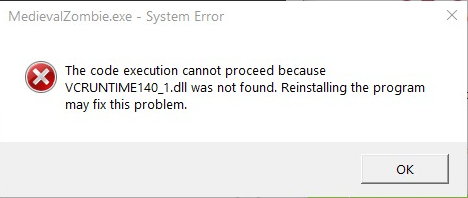
Link tải:

3. Unable to Update. If the game reports that it cannot be updated, click the Verify button to scan and fix the issue.
3. Báo lỗi không thể cập nhật: Bấm vào nút Kiểm Tra để fix lỗi.
Baca...